

Network
The page for Network Settings shows the device’s current network connection status and basic IP configuration. This page is used to verify connectivity, confirm IP details, and access advanced network configuration when troubleshooting or setting up the device.
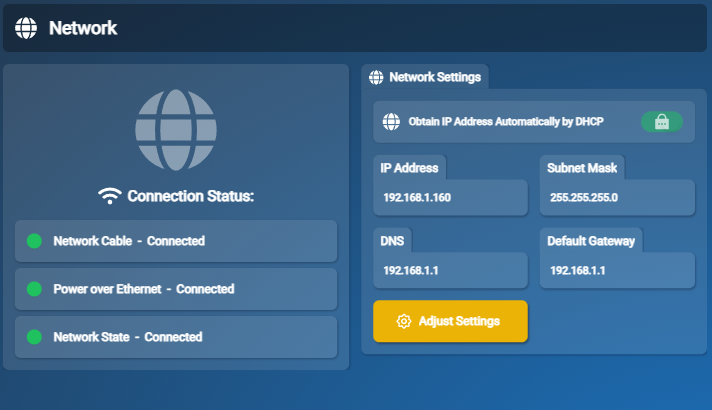
| Parameter | Description |
|---|---|
| Network Cable | Indicates if the unit has an Ethernet cable connection or not |
| Power over Ethernet (PoE) | Confirms whether the device is receiving power through the Ethernet cable or not |
| Network State | Displays whether network connectivity is active and functioning or disconnected |
| Obtain IP Address Automatically by DHCP | Information on whether the device automatically receives its network settings from the router or if it has been manually set |
| IP Address | The unique address assigned to this device on the local network |
| Subnet Mask | Defines the local network range |
| Default Gateway | The router address used to reach external networks (e.g., the internet) |
| DNS | The server used to translate domain names into IP addresses |
Adjust Settings:
Section titled “Adjust Settings:”Opens advanced network configuration options. From here, automatic IP address assignment (DHCP) can be disabled, allowing the IP address and related network settings to be configured manually.